
Software
What's already on the machine.
A full Windows 11 desktop with the tools already installed. Sign in with your own licences.
By the Coreframe Cloud team · Updated
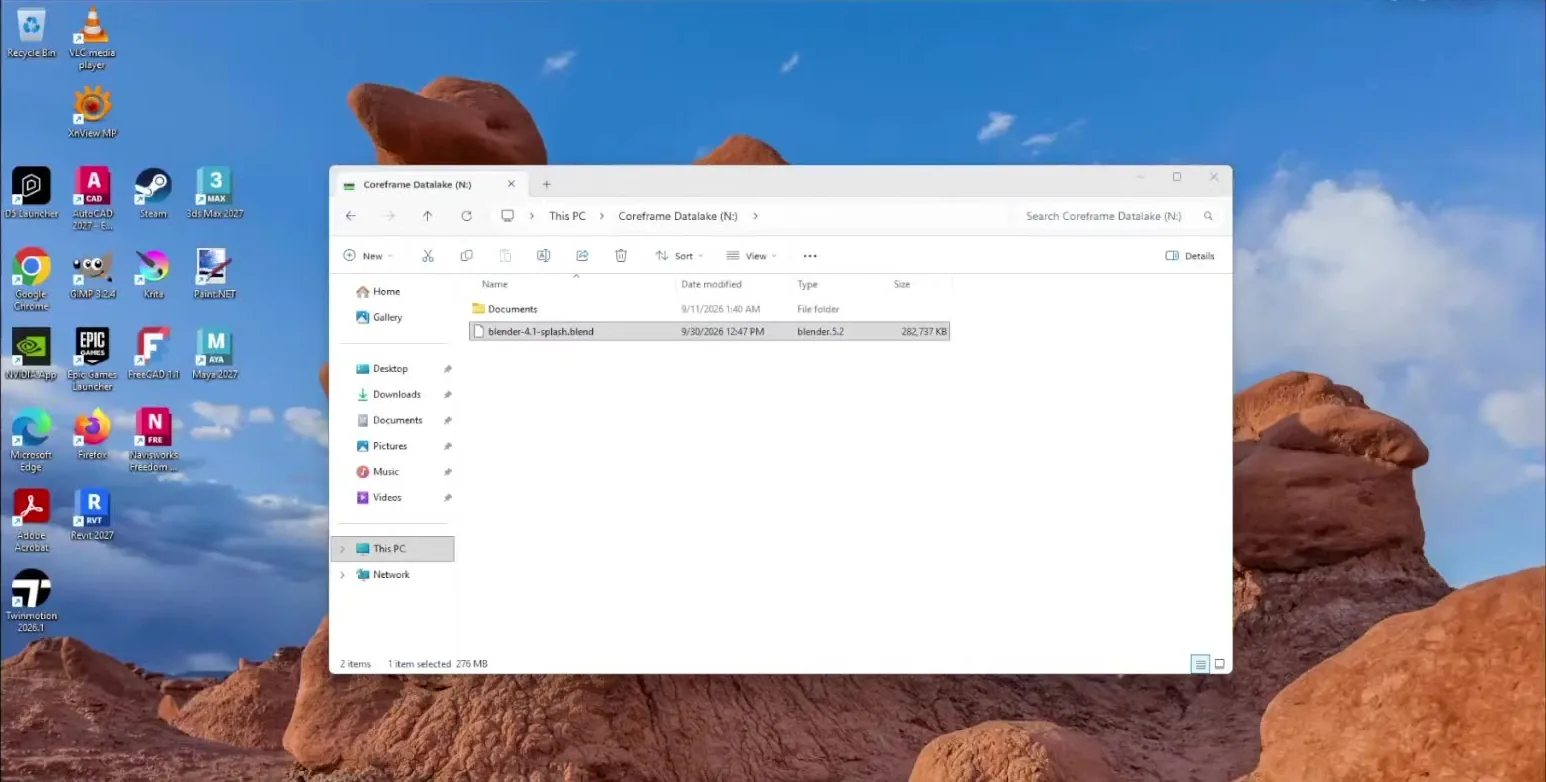
Your files and the apps, on one machine.
Ready to use, no licence needed.
Free and open-source software on the standard image. Open it and start working.
Platforms & runtimes
Installed and ready; sign in with your own Steam account. Useful for Steam-distributed tools and benchmarks, and for anything you already own there.
3D & rendering
Full modelling, sculpting and rendering suite. Free and open source, so it is ready to use with no licence of your own.
Twinmotion 2026.1 HF2, installed and ready. Sign in with your own Epic account when you need a commercial licence; the free tier covers most individual users.
Unreal Engine 5.8 with Quixel Bridge, installed and ready. Datasmith imports models from Revit and SketchUp.
Installed and ready — sign in with your own D5 account. The free tier covers a lot of individual work.
Parametric CAD that opens the STEP, IGES and DXF files engineering consultants send.
Post-processing and visualisation for CFD and simulation results.
CAD viewers
Open, measure and plot DWG drawings without needing an AutoCAD seat.
Review NWD coordination models from consultants.
Images & textures
Texture work and render post-processing without a Photoshop subscription.
Digital painting and texture authoring.
Quick crops, resizes and touch-ups.
Browse, batch-convert and contact-sheet a whole folder of renders at once.
Utilities
Unpack the .zip, .rar and .7z scene archives clients send.
- Google Chrome & Mozilla Firefox
Sign in to asset libraries and your own software licence portals.
Drawings, specifications and tender documents arrive as PDF.
Play back rendered walkthrough video before you download it.
Edit config, material and script files.
Run Blender and Revit automation scripts.
Write and debug Blender, Dynamo and Revit scripts.
Turn a rendered image sequence into a video file before you download it.
System
- NVIDIA Studio driver
The GPU driver tuned for creative applications rather than games.
- Visual C++ & .NET runtimes
The runtime libraries every render engine and CAD add-in expects to find.
Your licence, our machine.
These are licensed to you, and the licence stays yours. Adobe Creative Cloud is already installed; you sign in with your own Adobe account. The others we set up with you once, since the vendor only lets you download from your own account. After that they're on every workstation you launch, signed in with your subscription. We never supply licences for commercial software.
Rendering
Sign in with your Lumion account.
A plugin — install its host application (Revit, SketchUp, Rhino or Archicad) first.
Chaos account or your licence server.
Real-time ray tracing for large scenes.
For 3ds Max and Cinema 4D workflows.
Product and industrial visualisation.
CAD & BIM
Install from your own Autodesk account.
Install from your own Autodesk account.
Install from your own Autodesk account.
Install from your own Autodesk account.
Sign in with your Trimble account.
Evaluation available; then your own licence key.
Graphisoft licence required.
Images & textures
Installed; sign in with your own Adobe account.
Read this before you start
The workstation resets when your session ends.
Anything left on the desktop is wiped when the session ends. Every customer starts from the same clean machine.
We built it that way on purpose. It means nothing from anyone else's project can reach you, which matters when your work is under NDA. Keep your files on the NAS drive, which persists between sessions and is mapped into every workstation you launch.
Using the same application every day? Tell us and we'll add it to the standard image, so it's waiting for you next time.
Questions
What people ask about the software.
- What software is preinstalled on a Coreframe GPU workstation?
- Every workstation ships with Steam, Blender, Twinmotion, Unreal Engine, D5 Render, FreeCAD, ParaView, Autodesk DWG TrueView, Autodesk Navisworks Freedom, GIMP, Krita, Paint.NET, XnView MP, 7-Zip, Google Chrome & Mozilla Firefox, Adobe Acrobat Reader, VLC, Notepad++, Python, Visual Studio Code, HandBrake & FFmpeg, NVIDIA Studio driver and Visual C++ & .NET runtimes, along with the NVIDIA Studio driver and the Visual C++ and .NET runtimes. They are ready the moment the desktop appears.
- Can I install my own software on a Coreframe workstation?
- We install applications for you. Your session runs as a standard Windows user, which is how we can guarantee the workstation goes back to a clean image before the next customer. D5 Render, Twinmotion, Unreal Engine, Blender and the rest of the standard set are already on the machine. Revit, AutoCAD, 3ds Max, V-Ray, Lumion and Enscape we set up with you once, because those vendors only let you download from your own account. After that they're on every workstation you launch, running on your own licence.
- Does Coreframe provide licences for D5 Render, Lumion or Autodesk software?
- No. Commercial applications are licensed to you, and the licence doesn't come with the machine. You sign in with your own subscription, the same as on your own PC. Only free and open-source software is ready to use without a licence of your own.
- Does software I install stay on the workstation for next time?
- Every session starts from an identical clean image, so nothing from the previous customer, or from your own last session, is left on the machine. Your project files are kept separately on NAS storage, and that does persist between sessions. If you need a particular application every day, tell us and we'll add it to the standard image.