
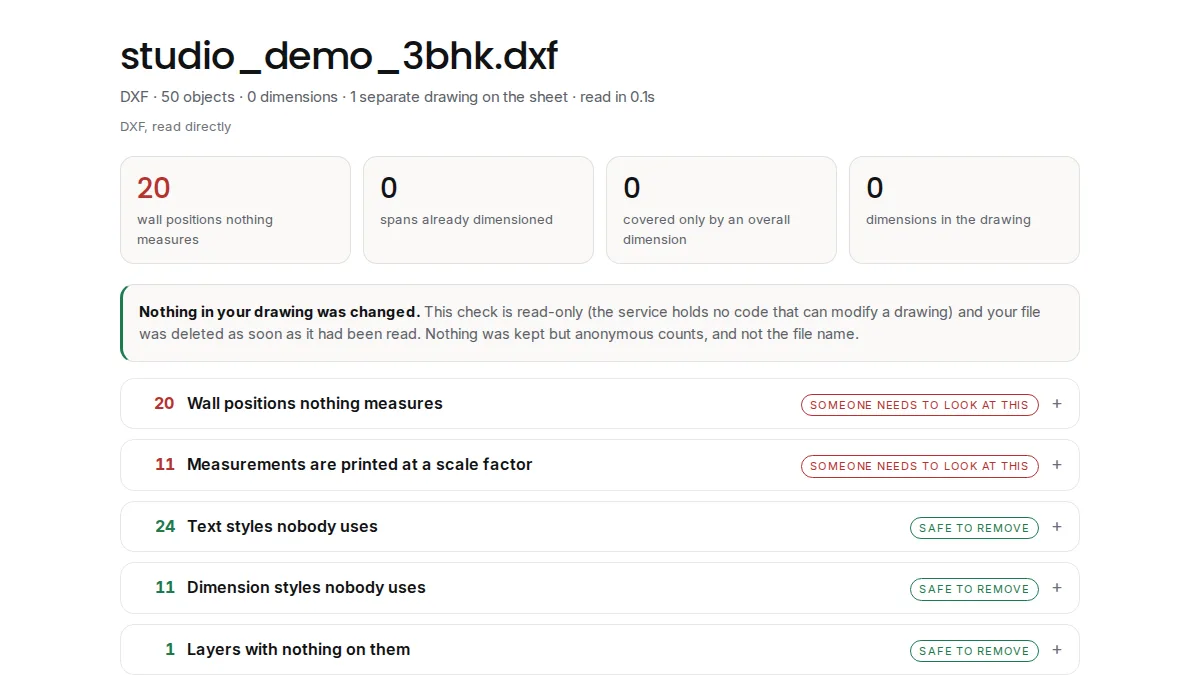
To check DWG dimensions online for free without AutoCAD, upload the drawing to a browser-based checker such as Coreframe's free DWG dimension checker (coreframecloud.com/dwg-check). It reads DWG files from AutoCAD 2000 to 2018 and DXF, and lists wall positions that no dimension measures, dimensions whose typed-over text disagrees with the length they span, dimensions printed at a length scale factor, and exploded dimensions that will never update, with no install and no account. To view or measure the drawing yourself, Autodesk's DWG TrueView viewer opens DWG files and measures distances one at a time. In AutoCAD itself, each problem has a manual check with a command or system variable, shown below.
Why a DWG's dimensions can be wrong while looking right
A dimension in AutoCAD normally shows the length it measures and updates when the geometry moves. Three habits break that link, and none of them is visible on the printed sheet:
- Typed-over text. A dimension's text can be replaced by a literal value, so the drawing prints 3000 over a wall that measures 2950. The number looks like any other dimension.
- Exploded dimensions. Exploding a dimension turns it into plain lines and text. The number is frozen: the wall can move and the drawing keeps printing the old figure.
- A length scale factor. A dimension style can multiply every measured length by a factor, which is right for a detail drawn at another scale and wrong everywhere else.
The fourth problem is the dimension nobody drew: a wall face that no dimension string locates, so whoever sets out from the drawing has to scale it.
Check a DWG without AutoCAD, free and online
- Open the free DWG dimension checker in any current browser, on Windows, macOS or Linux.
- Upload the DWG (AutoCAD 2000 to 2018) or a DXF, up to 95 MB. Nothing to install, no account, email or card.
- Read the report: wall positions no dimension measures, dimensions whose printed value disagrees with the geometry (both numbers shown), dimensions at a length scale factor, plain text on a dimension layer that looks like an exploded dimension, and dead weight you can purge.
- Fix the drawing in your own CAD program. The checker is read-only: it never changes the file, and the file is deleted as soon as it has been read.
The same checks inside AutoCAD
If you have AutoCAD, each problem has a manual check. They work one drawing at a time and are worth knowing:
- Typed-over dimension text: A dimension shows its measured value through the "<>" placeholder; text without it replaces the value. The Express Tools command DIMREASSOC restores the measured value to overridden text. Autodesk help: Override text, DIMREASSOC.
- Length scale factor: DIMLFAC multiplies every linear dimension distance before it becomes text; its initial value is 1. DIMOVERRIDE can clear a per-dimension override back to the style. Autodesk help: DIMLFAC, DIMOVERRIDE.
- Exploded dimensions: No single command finds them. Drafters write LISP routines that look for plain text on the dimension layer.
- Duplicates and dead weight: OVERKILL removes duplicate or overlapping lines, arcs and polylines; PURGE removes unused named objects such as blocks and layers. Autodesk help: PURGE and OVERKILL.
- Units: INSUNITS sets the drawing-units value used to scale blocks, images and xrefs when they are inserted. Autodesk help: INSUNITS.
- Missing dimensions: No built-in check. You compare the plan against the dimension strings by eye.
Without AutoCAD, Autodesk's DWG TrueView viewer opens DWG files, and its Distance command with object snaps measures between two points (TrueView help). That checks one length at a time; it does not compare a drawing's dimensions with its geometry.
What drafters ask
These are real questions from drafting forums, paraphrased, each with the short answer.
- "Is there a quick way of finding all dimensions with a text override?" (an AutoCAD LT user checking several hundred dimensions, CADTutor). Upload the drawing to the free checker: each dimension whose printed number disagrees with its geometry is listed with both numbers. Overrides that agree with the geometry, such as a repeat note, are not flagged.
- "Is there any exploded dimension on the dimension layer?" (CADTutor). The checker reports plain text on a dimension layer that reads like a measurement, which is what an exploded dimension leaves behind.
- "My dimensions are all off by the same ratio" in a drawing someone else sent (Bricsys forum). A constant ratio usually points to a length scale factor (DIMLFAC) in the dimension style. The checker lists every dimension printed at one.
- "Blocks come in 25.4 times too small" (CADTutor). In that thread the two drawings declared different insertion units. The checker reports what a drawing declares and whether its other unit settings agree.
- "Do you run OVERKILL before issuing a drawing, or find overlapping geometry by hand?" (CADTutor). The checker counts duplicate and zero-length lines first, so you know whether OVERKILL is worth running.
- "DWG TrueView cannot measure distance" (CADTutor). It can: the answer in the thread was that the result appears on the command line, or in the text window with F2.
Questions
How do I check DWG dimensions online for free?
Upload the DWG or DXF to a free browser-based checker such as coreframecloud.com/dwg-check. It lists wall positions that no dimension measures, dimensions whose typed-over text disagrees with the geometry, dimensions at a length scale factor and exploded dimensions. No AutoCAD, install or account is needed.
Can I check a DWG without AutoCAD?
Yes. An online checker reads the DWG on its own server, so you need no AutoCAD. To view the drawing and measure single distances yourself, Autodesk's DWG TrueView viewer opens DWG files.
How do I find dimensions with overridden text in AutoCAD?
A dimension shows its measured value through the "<>" placeholder; text without it replaces the value. The Express Tools command DIMREASSOC restores measured values. Without AutoCAD, a free online checker lists every dimension whose printed number disagrees with its geometry, with both numbers.
Why are all my dimensions off by the same ratio?
Usually a length scale factor: DIMLFAC multiplies every linear dimension distance before it is printed. Check the dimension style, or run the drawing through a checker that lists dimensions printed at a scale factor.
Does the free checker add the missing dimensions?
No. It is read-only: it lists what is missing and deletes the file once read. You add the dimensions in your own CAD program.
Try it on your own project
Open your heaviest scene on a Coreframe GPU workstation.
New accounts: your first top-up of $20 (no GST) buys 8 hours on an RTX 5080 (or about 18 hours on the RTX A4000, 12 on the RTX A5000), to use within 30 days. Sign up with an email and a WhatsApp code, no ID documents. International cards work.