
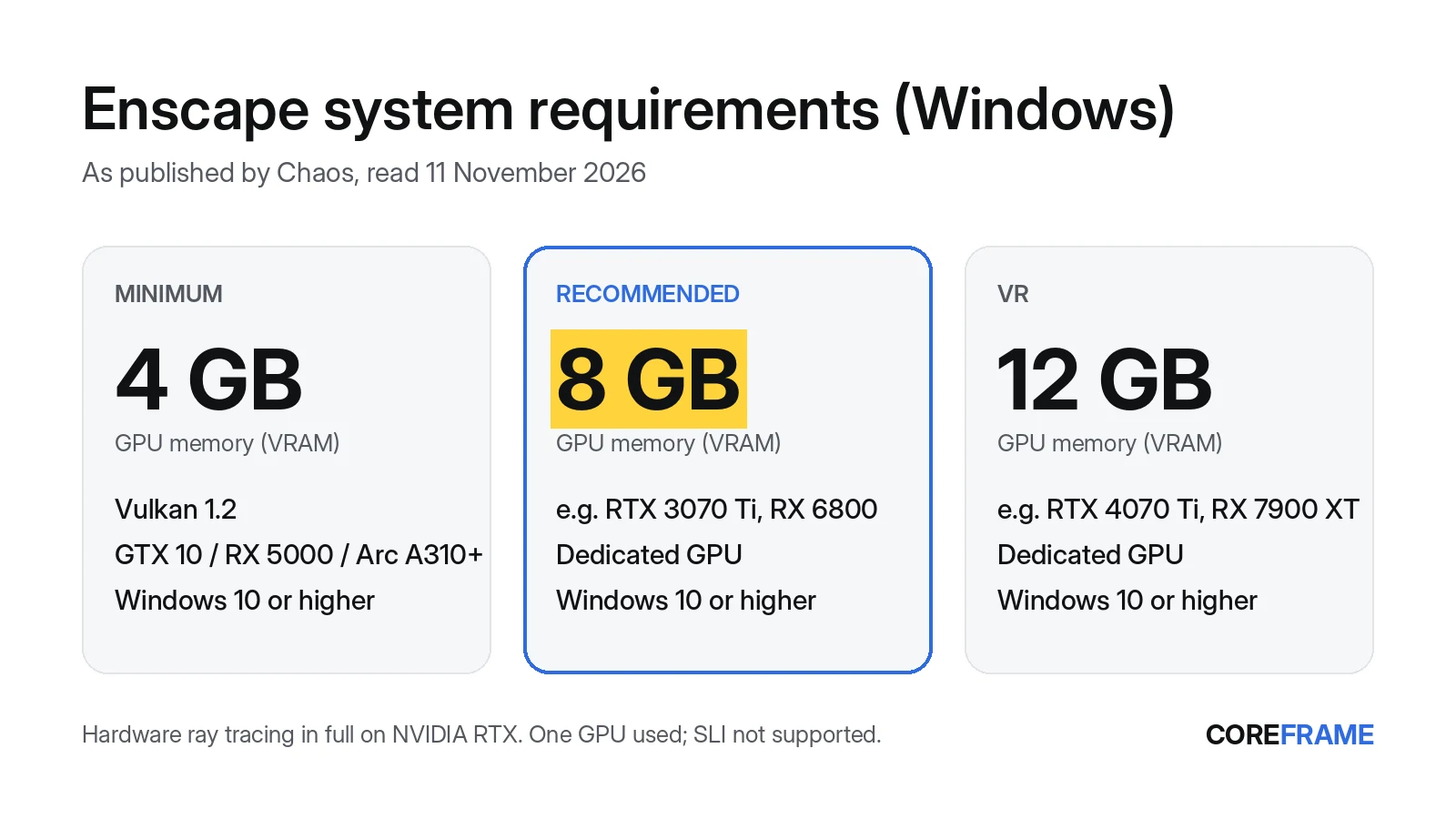
Enscape runs on Windows 10 or higher and needs a graphics card with at least 4 GB of video memory (VRAM) and Vulkan 1.2 support: an NVIDIA GeForce GTX 10 or Quadro P series card or newer, an AMD Radeon RX 5000 series card or newer, or an Intel Arc A310 or newer. Chaos recommends 8 GB of VRAM (for example an RTX 3070 Ti or RX 6800) and 12 GB for VR. Hardware ray tracing works in full only on NVIDIA RTX cards. Recent Intel and AMD integrated graphics can run Enscape at the minimum, but without ray tracing or VR.
Enscape system requirements for Windows
These are Chaos's own figures, from Enscape's system requirements page and its recommended hardware article, as we read them on 11 November 2026. Chaos updates them with new Enscape versions, so check before you buy hardware.
Enscape on Windows, as published by Chaos (checked 11 November 2026)
Operating system     Windows 10 or higher
GPU, minimum         4 GB VRAM with Vulkan 1.2: GeForce GTX 10 / Quadro P series, Radeon RX 5000 / Radeon Pro, Intel Arc A310, or newer
GPU, recommended     8 GB VRAM, e.g. GeForce RTX 3070 Ti or Radeon RX 6800
GPU, VR              12 GB VRAM, e.g. GeForce RTX 4070 Ti or Radeon RX 7900 XT
Integrated graphics  Minimum only: Intel 13th gen+ (UHD 64EU laptop, UHD 730 desktop), Ryzen 6000 (660M+) or 7000 (740M+); no VR or ray tracing
Ray tracing          Full hardware ray tracing on NVIDIA RTX; not available on most AMD cards
Multiple GPUs        SLI not supported; Enscape uses one GPU
Drivers              The latest, or at least Chaos's recommended drivers
Other software       .NET Framework 4.5.2+, Visual C++ 2015–2019 Redistributable, Vulkan Runtime
Host applications    Revit 2024–2027 (not LT), SketchUp 2024–2026, Rhino 7 and 8, Archicad 28–30, Vectorworks 2025–2027
Chaos also says, in its own words, that the more complex the scene, the more memory it needs, and recommends a GPU with as much memory as possible. The 8 GB figure is a starting point for typical projects, not a ceiling. Our VRAM guide shows how to read what your own project uses.
Can a laptop run Enscape?
Many can, with limits. A laptop with a dedicated card of 4 GB or more meets the minimum, and Chaos now lists recent integrated graphics too (Intel 13th-gen UHD 64EU and newer, AMD Radeon 660M and 740M and newer), but only at the minimum tier, with no ray tracing and no VR. For the recommended 8 GB you need a gaming or workstation laptop with an 8 GB card.
Enscape uses one GPU. On a laptop with both an integrated chip and a dedicated card, set the dedicated card as the high-performance GPU for your host application (Revit, SketchUp, Rhino) in Windows' graphics settings, because Enscape runs inside it. Task Manager (Ctrl+Shift+Esc) → Performance shows each GPU and its Dedicated GPU memory.
Enscape on a Mac
Enscape has a Mac version for Apple silicon (M1 and newer) on macOS 14.8.1 Sonoma or later; Intel Macs are not supported, and Chaos says Parallels and Boot Camp aren't either. The Mac version works with SketchUp, Rhino, Archicad and Vectorworks. Revit isn't on the Mac list, so Enscape for Revit needs Windows.
Which Coreframe workstation for Enscape
A Coreframe workstation is a Windows desktop with a dedicated NVIDIA RTX GPU (so hardware ray tracing is available), streamed to your laptop. You install your host application and Enscape with your own licences; we don't supply either. Chaos's pages don't make a statement about cloud or virtual desktops, so treat your first session as the test. The cheapest card for each need, at today's prices:
| Enscape asks for | Coreframe card that meets it | Price (no GST) |
|---|---|---|
| Minimum: 4 GB VRAM | RTX A4000 (16 GB VRAM, 64 GB RAM) | $1.49/hr |
| Recommended: 8 GB VRAM | RTX A4000 (16 GB VRAM, 64 GB RAM) | $1.49/hr |
| Heavy scenes: 4K textures, site context, federated models | RTX A5000 (24 GB VRAM, 64 GB RAM) | $2.29/hr |
Chaos's own advice for complex scenes is a GPU with as much memory as possible, so the third row is ours, not Chaos's: it's for projects that measure well above 8 GB. We haven't tested Enscape's VR mode over a streamed workstation, so we don't recommend a card for VR. Not sure where your project sits? Measure its memory first.
If your laptop falls short
Instead of buying a new laptop for Enscape, you can run Revit, SketchUp or Rhino with Enscape on a remote workstation and stream it. It's billed per minute from when you connect, and preparing the machine and uploading files cost nothing. If a connection fails on our side, nothing is charged. If you don't connect within 10 minutes of your workstation being ready, it shuts down and those 10 minutes are charged. Project files stay on Coreframe storage between sessions. You connect from the Coreframe Connect app on a Windows laptop. 4K at 60 fps looks its best on about 50 Mbps and still holds up at 35 Mbps. 1080p is comfortable on 20 Mbps.
Cards start at $1.49/hr with no GST. More on the setup is on Enscape on a cloud GPU.
Questions
What are the minimum requirements for Enscape?
Per Chaos (read 11 November 2026): Windows 10 or higher and a GPU with at least 4 GB of VRAM and Vulkan 1.2, such as an NVIDIA GeForce GTX 10 or Quadro P series card, an AMD Radeon RX 5000 series card or an Intel Arc A310, or newer.
How much VRAM does Enscape need?
4 GB at the minimum, 8 GB recommended and 12 GB for VR, per Chaos. Chaos also says complex scenes need more and recommends as much GPU memory as possible.
What graphics card is recommended for Enscape?
Chaos recommends a card with 8 GB of VRAM, giving the GeForce RTX 3070 Ti and Radeon RX 6800 as examples, and 12 GB for VR (RTX 4070 Ti, RX 7900 XT). Full hardware ray tracing is available on NVIDIA RTX cards.
Can Enscape run on integrated graphics?
At the minimum tier only: Chaos lists Intel 13th-gen and newer integrated graphics (UHD 64EU on laptops, UHD 730 on desktops) and AMD Ryzen 6000 (Radeon 660M+) and 7000 (740M+). Integrated graphics get no VR and no hardware ray tracing.
How much RAM does Enscape need?
Chaos doesn't publish a RAM figure for Enscape. Size RAM for your host application (Revit, SketchUp, Rhino, Archicad or Vectorworks), because Enscape runs inside it.
Does Enscape work on a Mac?
Yes, on Apple silicon Macs (M1 and newer) with macOS 14.8.1 or later, for SketchUp, Rhino, Archicad and Vectorworks. Intel Macs aren't supported, and Revit isn't on Chaos's Mac list.
Which Coreframe workstation meets Enscape's recommended specs?
The RTX A4000, with 16 GB of VRAM against Chaos's recommended 8 GB, for $1.49/hr with no GST, billed per minute. You install your host application and Enscape with your own licences.
Try it on your own project
Open your heaviest scene on a Coreframe GPU workstation.
New accounts: your first top-up of $20 (no GST) buys 8 hours on an RTX 5080 (or about 18 hours on the RTX A4000, 12 on the RTX A5000), to use within 30 days. Sign up with an email and a WhatsApp code, no ID documents. International cards work.