
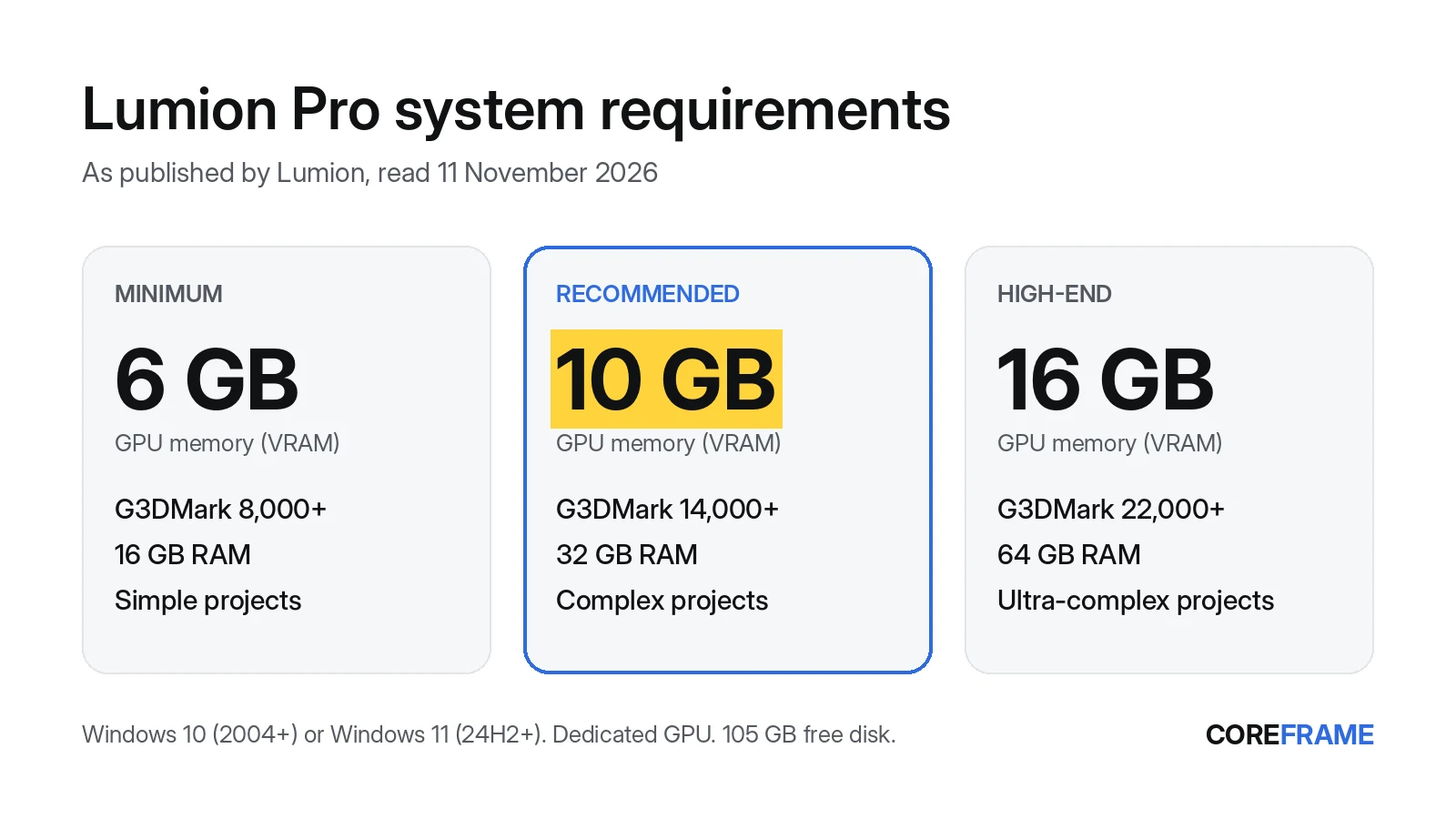
Lumion Pro needs Windows 10 (version 2004 or later) or Windows 11 (24H2 or later), an internet connection and a dedicated graphics card: integrated graphics won't do. Lumion's minimum is a card with 6 GB of video memory (VRAM) and a G3DMark score of 8,000, with 16 GB of RAM, and it says that tier suits simple projects only. For complex projects it recommends 10 GB of VRAM, a G3DMark of 14,000 and 32 GB of RAM; for ultra-complex ones, 16 GB of VRAM, 22,000 and 64 GB. The full install takes about 115 GB of disk.
Lumion system requirements for a PC or laptop
These are Lumion's own figures for Lumion Pro, from its system requirements page, as we read them on 11 November 2026. Lumion updates them with new versions, so check the page before you buy hardware.
Lumion Pro, as published by Lumion (checked 11 November 2026)
Operating system       Windows 10 v2004 (build 19041) or newer, or Windows 11 24H2 (build 26100) or newer
Graphics card          Dedicated NVIDIA, AMD or Intel (Arc A580 / B580 and better); not onboard graphics
Minimum                G3DMark 8,000+, 6 GB VRAM, 16 GB RAM (simple projects)
Recommended            G3DMark 14,000+, 10 GB VRAM, 32 GB RAM (complex projects)
High-end               G3DMark 22,000+, 16 GB VRAM, 64 GB RAM (ultra-complex projects)
Ray tracing / 4K       At least 8 GB VRAM for 1080p ray tracing or 4K rasterisation
CPU (single thread)    CPUMark 2,200+ minimum, 2,600+ recommended, 3,000+ high-end
Disk                   105 GB free for the full version (12 GB for the trial); SSD, NVMe recommended
Internet               The PC must be online while Lumion runs
Drivers (Lumion 2026)  NVIDIA 591.86+, AMD 26.1.1+, Intel 101.8509+
VRAM is the line that decides whether a scene opens. A card with a high G3DMark score but too little memory will still stall or refuse a large scene, while a slower card with enough memory gets there. Our VRAM guide shows how to measure what your own project uses.
Can a laptop run Lumion?
Only a laptop with a dedicated graphics card that meets the minimum. Lumion says it needs a dedicated card, not onboard (integrated) graphics, so a thin laptop with Intel Iris, Intel UHD or integrated Radeon graphics alone can't run Lumion Pro. A gaming or workstation laptop with a 6 GB card clears the minimum but sits in Lumion's "simple projects" tier; for the recommended tier you need a 10 GB card, which few laptops have, and 32 GB of RAM.
If the laptop has both an integrated chip and a dedicated card, Lumion's page says to make sure Lumion uses the intended GPU. Set the dedicated card as the high-performance GPU for Lumion in Windows' graphics settings. To see what you have, open Task Manager (Ctrl+Shift+Esc), go to Performance and read Dedicated GPU memory. We wrote up that check in can your laptop run D5 Render or Lumion.
How big is Lumion? (download and install size)
Lumion's file space article gives the full Lumion 2026 commercial version as a 46.4 GB download and 115 GB installed; the trial is 11.8 GB. It also asks you to keep at least 30 GB, preferably 50 GB or more, free on the C: drive after installing. On a laptop with a 256 GB or 512 GB SSD, that is a large share of the disk before any project files.
Does Lumion run on a Mac?
Not officially. Lumion's requirements page says Lumion Pro is not officially supported on Mac, and describes running it through Windows with Apple's Boot Camp on a relatively new Mac with a fast GPU. Coreframe's Connect app is Windows-only for now as well, so a remote workstation doesn't help on a Mac yet.
Can Lumion run on a cloud or virtual workstation?
Lumion's requirements page says Lumion 9.0 and newer are supported on some virtual PC and remote desktop platforms, and warns that many cloud desktops don't meet the requirements. So check the machine against the same table: a dedicated, display-capable GPU with enough VRAM, enough RAM and the disk space. Lumion's trial includes a benchmark that tests the GPU, GPU memory, CPU and RAM; it's the quickest way to check any machine, yours or a rented one.
Which Coreframe workstation for each Lumion tier
A Coreframe workstation is a Windows desktop with a dedicated workstation-class GPU, streamed to your laptop. You install Lumion with your own Lumion licence; we don't supply it. The cheapest card that meets each tier's memory and RAM lines, at today's prices:
| Lumion tier asks for | Coreframe card that meets it | Price (no GST) |
|---|---|---|
| Minimum: 6 GB VRAM, 16 GB RAM | RTX A4000 (16 GB VRAM, 64 GB RAM) | $1.49/hr |
| Recommended: 10 GB VRAM, 32 GB RAM | RTX A4000 (16 GB VRAM, 64 GB RAM) | $1.49/hr |
| High-end: 16 GB VRAM, 64 GB RAM | RTX A4000 (16 GB VRAM, 64 GB RAM) | $1.49/hr |
We match the memory lines, the ones you can check on a spec sheet. Lumion's tiers also set a G3DMark speed score, which we haven't measured on our cards, so run Lumion's built-in benchmark in your first session before you commit a deadline to it. For ultra-complex scenes, the RTX A5000 (24 GB, $2.29/hr) leaves more room above Lumion's 16 GB line. If you're not sure how much memory your project uses, measure it first.
If your laptop falls short
The alternative to buying a new machine is to run Lumion on a remote workstation and stream it to the laptop you have. It's billed per minute from when you connect, and preparing the machine and uploading files cost nothing. If a connection fails on our side, nothing is charged. If you don't connect within 10 minutes of your workstation being ready, it shuts down and those 10 minutes are charged. Your project files stay on Coreframe storage between sessions, so the 115 GB install and your assets don't fill your laptop. You connect from the Coreframe Connect app on a Windows laptop. 4K at 60 fps looks its best on about 50 Mbps and still holds up at 35 Mbps. 1080p is comfortable on 20 Mbps.
Cards start at $1.49/hr with no GST. More on the setup is on Lumion on a cloud GPU.
Questions
What are the minimum requirements for Lumion?
Per Lumion (read 11 November 2026): Windows 10 v2004 or newer, a dedicated graphics card with a G3DMark score of 8,000 or more and 6 GB of VRAM, 16 GB of RAM, a CPU with a single-thread CPUMark of 2,200 or more, 105 GB of free disk and an internet connection. Lumion says this tier suits simple projects only.
What graphics card do I need for Lumion?
A dedicated card: Lumion recommends a G3DMark score of 14,000 or more with 10 GB of VRAM (examples it gives: RTX 3060, RTX 2000 Ada, RX 6700 XT), and 22,000 or more with 16 GB for ultra-complex projects (RTX 3090, RTX A6000, RX 6800 XT). Integrated graphics are not supported.
How much RAM does Lumion need?
16 GB at the minimum, 32 GB recommended for complex projects and 64 GB for Lumion's high-end tier, per Lumion's requirements page.
Can I run Lumion on a laptop with integrated graphics?
No. Lumion requires a dedicated graphics card; onboard or integrated graphics don't meet its requirements, whatever the processor.
How many GB is Lumion 2026?
Lumion lists the full Lumion 2026 version as a 46.4 GB download and 115 GB installed, and the trial as 11.8 GB. Keep at least 30 GB, preferably 50 GB or more, free on C: after installing.
Does Lumion work on a Mac?
Lumion says Lumion Pro is not officially supported on Mac; it describes running Windows through Boot Camp instead. Coreframe's Connect app is Windows-only for now too.
Which Coreframe workstation meets Lumion's recommended specs?
The RTX A4000: 16 GB of VRAM and 64 GB of RAM, above Lumion's recommended 10 GB and 32 GB, for $1.49/hr with no GST, billed per minute. You install Lumion with your own licence.
Try it on your own project
Open your heaviest scene on a Coreframe GPU workstation.
New accounts: your first top-up of $20 (no GST) buys 8 hours on an RTX 5080 (or about 18 hours on the RTX A4000, 12 on the RTX A5000), to use within 30 days. Sign up with an email and a WhatsApp code, no ID documents. International cards work.