
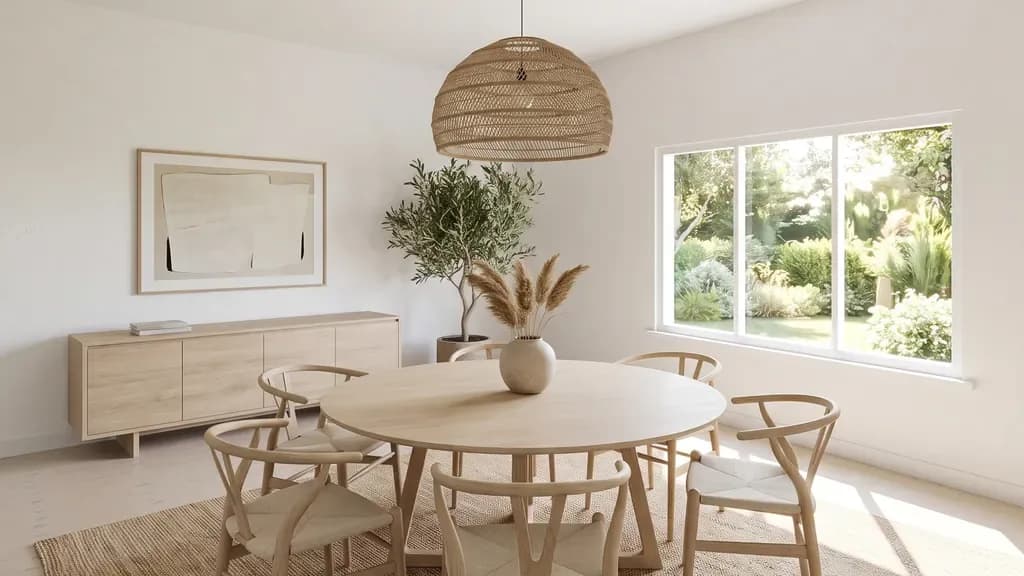
To test several design directions quickly, build the model once, fix three or four camera views, and compare each option in a real-time renderer such as D5 Render, Enscape, Twinmotion, Lumion or Blender's Eevee, where a change shows in seconds instead of hours. Render at full quality only the option the client picks. Realism comes less from the software than from five habits: textures at real-world scale, one believable light source (an HDRI sky or the sun), slightly rounded edges, a camera at eye height with a 24–28 mm lens and straight verticals, and a little lived-in detail. AI style images are good for setting a mood, but they shouldn't drive design decisions, because they don't follow your model's dimensions, materials or daylight.
How to explore several design directions without days of rendering
The time goes on two things: re-rendering every option at final quality, and re-setting cameras and lights between options so the images never quite compare. Both are avoidable.
- Block out the room once with real dimensions, and lock three or four cameras before you design anything: the entrance view, the main wall, a detail. Every option is judged from the same views.
- Keep each design direction as its own variant of the same file: a set of layers, a material set or a saved scene, whatever your tool calls it. Swap the variant; keep geometry, cameras and light fixed.
- Preview in real time at a modest resolution. A real-time engine (D5 Render, Enscape, Twinmotion, Lumion, Blender Eevee) shows a material or layout change in seconds, which is what you need while deciding.
- Put the options side by side from the same camera and the same light. Differences in the design then show, instead of differences in the render.
- Choose with the client, then spend the render time on the chosen option only: higher resolution, more samples or a path-traced pass, overnight if needed.
Should AI style images drive design decisions?
Use them for the brief, not for the decision. A text-to-image or style-transfer picture is quick and can be a good way to agree a mood, a palette or a reference with a client. But it is a picture of a room, not of your room: it doesn't hold your dimensions, it invents furniture and fittings that may not exist, and its daylight has nothing to do with your window or orientation.
- Fine: mood boards, early palettes, "which feeling do you prefer" conversations, references for a material you then build properly.
- Not fine: deciding a layout, a clearance, a ceiling height, a product, a finish the client will order, or how much daylight a room gets.
- The working rule: if the image will be used to decide something that gets built or bought, rebuild the idea in your own model and render that.
Five habits that make interior renders look real
Most renders that look "CG" fail on the same few things, and none of them depends on which program you use.
1. Textures at real-world scale
A floor plank, a tile or a fabric weave at the wrong size is the fastest giveaway. Set texture sizes in real units (a 600 × 600 mm tile is 600 mm in the material, not "tiling 4"), check them against an object of known size, and use a roughness or bump map so surfaces don't all reflect light the same way.
2. One believable light source, then exposure
Light the room the way it is lit in life: an HDRI sky or a physical sun through the actual windows, then set the camera's exposure, the way a photographer would, rather than adding fill lights until it looks bright. Add artificial lights only where real fittings are, at realistic colour temperatures.
3. Rounded edges
Nothing in a real room has a perfectly sharp edge, and sharp edges don't catch highlights. As Blender's manual puts it, slight rounding on edges helps to capture the specular highlights you would see in the real world. Add a small bevel to worktops, cabinets, door frames and furniture, or use a render-time effect: Blender's Bevel shader node, or the round-corner setting in D5's material editor.
4. Camera at eye height, 24–28 mm, verticals straight
People see a room standing on their feet, so put the camera at eye level rather than up near the ceiling. Chaos's guide to architectural perspective recommends that standing viewpoint, a 24 mm (tilt-shift) lens, and two-point perspective so that vertical lines stay perfectly vertical. A focal length of about 24–28 mm keeps the room recognisable; much wider and the corners stretch and the furniture near the edges distorts. Turn on two-point perspective or vertical correction in your renderer.
5. A little lived-in detail
A throw on the sofa, books not perfectly aligned, a slight variation between repeated objects. Real rooms are slightly imperfect; a render without any of that reads as a model.
Which software gives realistic interior renders?
All of the tools below can produce a realistic interior; the habits above matter more than the choice. What differs is how they work, what they plug into, and what they run on. Facts as published by each vendor, read on 6 November 2026:
| Tool | How it renders | Works with | Runs on | Free option |
|---|---|---|---|---|
| D5 Render | Real-time, hardware ray tracing (DirectX 12 + DXR) | Its own scene, imported from your modelling app | Windows | Community version (D5 account tier) |
| Enscape | Real-time, inside your modelling app | Revit, SketchUp, Rhino, Archicad, Vectorworks | Windows; macOS on Apple silicon (no Revit) | 14-day trial |
| Twinmotion | Real-time, plus a path tracer (not on macOS) | Its own scene, imported from your modelling app | Windows, macOS | Free below a revenue threshold set by Epic |
| Lumion | Real-time | Its own scene, imported from your modelling app | Windows only | 14-day trial |
| Blender | Cycles: path tracer. EEVEE: real-time | Itself (modelling included) | Windows, macOS, Linux | Free and open source |
| V-Ray | Ray-traced, for final images | Revit, SketchUp, Rhino, 3ds Max, Cinema 4D, Blender | Depends on the host app | 30-day trial |
| Corona | Ray-traced, for final images | 3ds Max, Cinema 4D | Windows (3ds Max); Windows or macOS (Cinema 4D) | 30-day trial |
Sources: D5 Quick Start and account versions; Enscape and its system requirements; Twinmotion specifications and Epic's licence page; Lumion requirements and free trial; Blender and its render manual; V-Ray; Corona. Terms change: check the vendor's page before you buy.
A rough way to choose: if you model in Revit, SketchUp, Rhino or Archicad and want to stay inside it, Enscape is the shortest path. If you want a separate real-time scene with a large asset library, D5, Twinmotion or Lumion. If you want full control and no licence cost, Blender. If you already model in 3ds Max and need the most accurate final stills, V-Ray or Corona.
When your laptop can't keep up
Real-time renderers lean on the graphics card: D5 Render, for example, needs a dedicated ray-tracing GPU and doesn't run on integrated graphics (its published system requirements are worth checking before you buy anything). If your laptop is the bottleneck, the options are a new workstation or a remote one. Coreframe is one of the remote options: a Windows desktop with an RTX GPU and D5 Render, Twinmotion and Blender installed, streamed to your laptop and billed per minute, so you can render on a cloud workstation for the weeks you need it.
Questions
How do I test several interior design options quickly?
Model the room once, lock three or four camera views, keep each option as a variant (layers, material sets or saved scenes) and compare them in a real-time renderer at modest resolution. Render at full quality only the option the client chooses.
Should AI-generated images be used to make design decisions?
Not on their own. They're useful for mood and references, but they don't follow your model's dimensions, products or daylight. Anything that will be built or bought should be decided from a render of your own model.
What makes an interior render look realistic?
Textures at real-world scale, one believable light source (HDRI or sun) with camera exposure, slightly rounded edges, a camera at eye height with a 24–28 mm lens and straight verticals, and a little lived-in detail.
Which software gives the most realistic interior renders?
Any of D5 Render, Enscape, Twinmotion, Lumion, Blender, V-Ray or Corona can produce realistic interiors. Path tracers such as Blender Cycles, V-Ray and Corona are the most physically accurate for final stills; real-time tools are faster for exploring options.
What focal length should I use for interior renders?
Around 24–28 mm (full-frame equivalent) at eye height, with vertical lines kept straight. Much wider lenses stretch the room and distort furniture near the edges of the frame.
Try it on your own project
Open your heaviest scene on a Coreframe GPU workstation.
New accounts: your first top-up of $20 (no GST) buys 8 hours on an RTX 5080 (or about 18 hours on the RTX A4000, 12 on the RTX A5000), to use within 30 days. Sign up with an email and a WhatsApp code, no ID documents. International cards work.